

If you want to appear in AI answers, allow the crawlers that fetch pages for live search and user requests. Whether to allow training crawlers is a separate business decision. Blocking everything with “AI” in its name, as many sites did in 2023, quietly removes you from the answers that matter now.
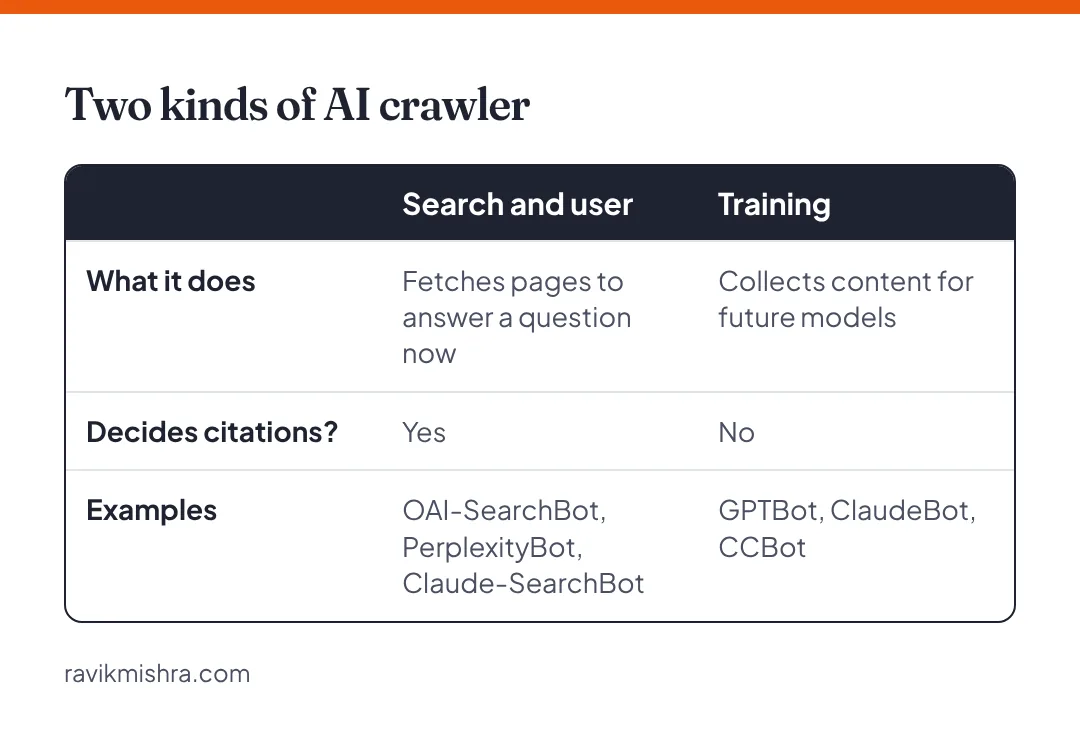
Two kinds of AI crawler
Search and user crawlers fetch your pages to answer a question right now. They decide whether you’re cited.
Training crawlers collect content to train future models. They influence what a model “knows” about you in later versions, but not today’s citations.
The main crawlers
| Company | Crawler | What it does |
|---|---|---|
| OpenAI | OAI-SearchBot | Fetches pages for ChatGPT search results |
| OpenAI | ChatGPT-User | Visits pages when a ChatGPT user’s request needs them |
| OpenAI | GPTBot | Collects content for model training |
| Perplexity | PerplexityBot | Indexes pages for Perplexity answers |
| Perplexity | Perplexity-User | Fetches pages for a user’s question |
| Anthropic | Claude-SearchBot | Indexes pages for Claude’s search results |
| Anthropic | Claude-User | Fetches pages when a Claude user asks |
| Anthropic | ClaudeBot | Collects content for model training |
| Googlebot | Normal Search crawling, which also feeds AI Overviews and AI Mode | |
| Google-Extended | A control token for Gemini model use; it doesn’t affect Google Search or AI Overviews | |
| Microsoft | Bingbot | Bing search, which also feeds Copilot |
| Common Crawl | CCBot | Open web dataset widely used for training |
Names change and new crawlers appear. Check each company’s documentation before you publish rules, and review your list every few months.
A robots.txt for visibility
This allows the main AI search and user crawlers explicitly. Your existing rules for everything else stay as they are.
User-agent: OAI-SearchBot
Allow: /

User-agent: ChatGPT-User
Allow: /

User-agent: PerplexityBot
Allow: /

User-agent: Claude-SearchBot
Allow: /

User-agent: Claude-User
Allow: /
If you want to block training while staying visible in search, add Disallow: / rules for GPTBot, ClaudeBot, CCBot and Google-Extended. Most brands that want to be known benefit from allowing training too, since it’s one of the ways models learn what you are. Publishers with paid content often decide differently.
robots.txt isn’t the only gate
A permissive robots.txt does nothing if something earlier blocks the request. Check these too:
- CDN and firewall bot protection. Cloudflare and similar services have settings that block AI crawlers by default or on request. Look in your bot management and firewall settings, and check logs for blocked requests from the user agents above.
- Rate limiting and challenges. A JavaScript challenge or CAPTCHA page stops most crawlers.
- JavaScript-only content. Many AI crawlers read the raw HTML and don’t run scripts. If your main text only appears after JavaScript loads, they see an empty page.
How to check it worked
Look at your server or CDN logs for requests from these user agents, and check that they get a 200 response rather than 403 or a challenge page. Then ask ChatGPT and Perplexity a question your page answers well and see whether it starts appearing as a source. That can take a few weeks for new or newly unblocked pages.
Frequently asked questions
Should I block GPTBot?
Only if you don’t want your content used to train OpenAI’s models. Blocking GPTBot does not remove you from ChatGPT search results; blocking OAI-SearchBot does.
Does robots.txt stop AI crawlers?
The major AI companies say their crawlers respect robots.txt. It is a request, not a lock, and your CDN or firewall can block crawlers even when robots.txt allows them.
How do I know if AI crawlers visit my site?
Check your server or CDN logs for their user agents, such as OAI-SearchBot or PerplexityBot, and confirm they receive a 200 response rather than 403 or a challenge page.